mardi 16 octobre 2007

Resizing pictures in batch under Linux!

Hi to all!

I have discovered a very easy way to resize a bunch of pictures using Linux.
First, you need to install imagemagick:

[CODE] sudo apt-get install imagemagick [\CODE]

Then, what I did was to copy all the pictures I wanted to resize into a temporay folder.
Finally, using the command line, I went to the previous folder, and typed the following:

[CODE] mogrify -resize 800x600 *.jpg [\CODE]

and all the pictures were resized.
Of course, you can choose any size you want. Instead of"mogrify", you can use "convert" which does not replace the picture but instead creates a new one with the desired size.

You can also rotate pictures. For instance:

[CODE] mogrify -rotate 90 picture.jpg [/CODE]

where "90" is the number of degrees you wish to rotate picture.jpg.

Here is a link with more infos on imagemagick:
http://polishlinux.org/apps/graphics/enchanting-pictures-with-imagemagick/

samedi 15 septembre 2007

Wow: more than 1000 visits!!!

Against all odds, I have crossed the 1000 visits mark a few days ago!
It is still a small blog, but I am happy that people come to visit it.
When I look at my Clustr Map, I even see people visiting from places I don't even know!

From now on, I will try to update my blog more regularly, but not next week since I am leaving for one week to Egypt!
Hopefully, I will have some pretty pictures to upload when I am back. However, I am going to Taba, which seems to be far from pretty much everything, so that I guess I won't get to see the pyramids.
I will focus on landscapes pictures then.

samedi 8 septembre 2007

Review of the new Toshiba Portege R500


Presentation

I have recently got the new ultra laptop by Toshiba, the Portege R500. I got it in Japan, and it is a non-standard version since its only a 1.06 Ghz processor, with no bluetooth, and no DVD writer. That way, it is the lightest 12" notebook available at under 1 kg (i.e. 2.2 pounds). It is even lighter than the 11"1 Asus U1F or the new Sony Vaio TZ!
As you can see in the pictures, it is also quite thin, at least as much as my former Asus U1F. It is also, of course, a bit bigger.
Compared to the U1, the packaging is quite scarce; you only got one battery (vs 2 for the Asus), no case...But, it only shows that Asus has really outdone itself with the packaging of the U1F.
In my opinion, the R500 is not as pretty as the U1, but it is of course, subjective. The biggest advantage of the R500 is that it does not have this glassy-style coating on the top, which, albeit very cute and styly, attracts fingerprints as much as honey attracts bears. The R500 is still a nice-looking machine.

Performances

This is where the R500 shines compared to the other ultras and to the U1F in particular. Indeed, more subnotebooks such as this one use a 4200 rpm hard drive, which tends to reduce performances a lot. In the R500, there is a 5400 rpm hard drive, and boy, what a difference it makes!
It boots more quickly (around one minute for linux), applications open up more quickly, transfers of files are quicker...
Even though the U1F and the R500 have the same processor, the R5OO just feels faster.
As to battery life, I have to admit that at first, I was a bit disappointed since with the Wireless on (no BT and no DVD drive), brightness set to 50% and while doing some light editing and web browsing, the battery lasts around 4 hours and 15 minutes under Linux. I guess it is a bit higher under Vista without Aero and the widgets.
Of course, more than 4 hours is a lot, but I was expecting more. However, one has to remember that this is only the so-called lightweight battery. Thus, I guess I will have to get the large battery when it is available if I want to be able to use it for one day of work without the need for the ac adpater.

The downside of having such a thin laptop and using a 5400 rpm HD is that the R500 tends to heat up rather quickly on the left-hand side (I guess where the hard drive is), but it remains ok. Consequently, the fan is almost always on, but is not too noisy. Still, in a quiet environment you definitely hear some noise.

On to the screen, which has received a lot of attention in different reviews. First, note that this is a mat screen and not a glossy one which means that it is easier to use outdoors, but that it is less appropriate for watching movies. Moreover, the lateral viewing angles are pretty limited, meaning that no more than 2 people can watch the screen at the same time; given the size of the screen however, I think it is ok all the same.
To conclude on the screen, I must say that it is not as bad as some people had it: I use my R500 a lot, and I have never had any problems with the screen yet. As I said, watching movies might be a bit difficult, but I have been able to watch a few without difficulties; the key lies in a good positionning of the screen.
I have not really experimented with the special "outdoor feature" of the screen since I am using Linux, and it does not work on Linux.
This is a great transition ta talk about Linux on the R500.


Linux

As I have just said I use Linux on my R500. Why Linux over Vista?
One great asset of Linux compared to Vista IMHO, is the more efficient use of RAM. Indeed, under Kubuntu Feisty, the starting memory usage is around 180 Mb, out of my 1000. With Firefox open (a few tabs and a few extensions), Thunderbird and emacs it rises to 310, and with a 760 pages pdf, to 360 Mb. It means that, indeed, under Linux, 512 Mb are quite enough for a reasonable use. Moreover, note that there are lighter desktops than KDE, and Firefox and Thunderbird are both memory hogs, which means that using Linux on old computers is really a good idea. With my R500, Linux is a lot faster than Vista.
Moreover, Vista is just XP with a new GUI (Aero) basically, and XP is quite an old OS. It does not stand the comparison with Linux. Even the 3D Aero is really laughable compared to the real 3D effects one can get with Compiz Fusion under Linux. So, even though

How does Linux fare on the R500? Quite well I must say. The beginning has been a bit rough, since I have tried many distros before finding the one that most satisfies my needs. I have tried Kubuntu Gutsy beta, Open SuSe 10.3 Beta, Fedora 7, Linux Mint 3.0 (I used this one on my U1F, but strangely, the installer crashed every time I tried to install Linux Mint on the R500...), Sabayon Linux 3.4e, PCLinuxOS2007...Each of these distros had something that I disliked, or didn't worked the way I wanted it to work. Sabayon was quite good, but it is Gentoo-based, and compiling from source is just tooooooooooo slow for my liking: I erased Sabayon when the install of Thunderbird took more than 30 minutes. Finally, I settled on Kubuntu Feisty 7.04 which does a good job at recognizing the hardware: the only things that do not work from scratch are the fingerprint reader, the outdoor button, and the SD card reader. I also have some issues with the brightness buttons that do work, but behave strangely. I don't really care about the fingerprint reader, the lack of SD card reader was a pain when I was in vacation, but it is not very important. I forgot to say that the little button on the left side of the R500 that allows to increase and decrease volume does not work from scratch, but I have been able to make it work thanks to xmodmap and xbindkeys...and some help!
This is THE weakness of Linux IMHO: it does a good job at recognizing most of your hardware, but when something does not work, it is a pain to make it work. I mean, even though I am not a Linux expert, I don't think I am an average computer user, and still, I have had some difficulties solving those problems. For instance, I haven't yet found how to make my SD card reader work. Of course, there is a lot of help available over the web, above all for ubuntu, but still, I think it remains a bit complicated for the average Joe (lot of command line involved...).
To conclude on Linux, I must add that I have a problem with my Vista partition, so that I can't access it now. But it's ok, I don't really care.
In any case, I am going to install Virtualbox and have a virtualized version of XP directly in Linux for stuff like Illustrator of Excel (yes I know there is Open Office, but the Spreadsheet does not handle VBA well, and I will need VBA next year) or chess programs. Maybe iTunes also.


Conclusion

Overall, I am happy with this purchase. The U1F was a lovely machine, and the R500 is a worthy replacement. The only thing I might want now is a SSD drive to improve performance once again.
But I will wait prices have gone down a bit, since I will need at least a 64 Gb one, which costs something like 900 dollars right now!


EDIT: A few additions

First, After using the Toshiba for watching movies during my holidays, I can confirm that the angles of vision are pretty limited. However, it is still possible for two persons to watch a movie end enjoy it.

Second, I have just discovered that I can adjust the brightness of the screen by hovering over the Knetworkmanager icon (under Kubuntu) and using vertical scrolling. Since I had some issues with the Fn+F6 and F7 keys, this is great discovery for me.

Third, I still have a few issues with my keyboard, since, when I type very fast, it tends to behave erratically. For instance, sometimes, if the insertion point of the mouse is not located where I am typing (that is, pretty much all the time) instead of typing where I want to, it types at the insertion point, which is generally located somewhere else in the text I am typying. This is very annoying, and I really don't understand why it is behaving this way.

mardi 31 juillet 2007

Asset Management it's gonna be!

Yes, I have been selected for the Master Asset Management in Dauphine, so, I guess that's what I am going to do next year.
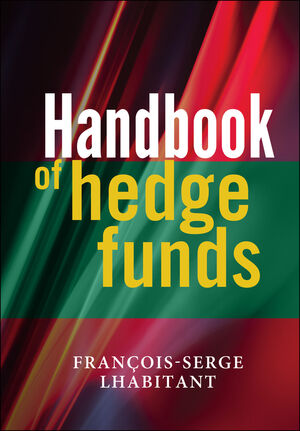
Hence, I will spend the summer reading books such as these:


Above all the last one, since I think I will specialize in Alternative Investments like Hedge Funds.

lundi 2 juillet 2007

Being interviewed...again!

Yes, since I have decided to give my future career a less theoretical and more practical direction, I have applied to two masters: one in "Financial Engineering" and one in "Asset Management".
I have been selected for an interview for both masters, and the first one takes place on Wednesday.
Hence, I am quite busy reading financial economics, corporate finance, asset management...books since my knowledge on these topics is pretty limited: indeed, when I look back at my formation in economics, I was a bit surprised to see that it was very weak in finance. I have never delve into the specifics of financial markets, options, derivatives and the likes. Luckily, the literature on these topics is quite vast so that I expect to be able to learn what I didn't during my previous studies. Of course, there is a lot of information to be digested, but I think I can do it!

See you soon for the results!

jeudi 7 juin 2007

Increase your laptop's battery life under Vista! (yes, it is possible!!!)

Hi!

So, you have a new laptop with Vista pre-installed, you are quite happy, then you check
this little icon in the system tray that says "100% battery : 1 hour 48 minutes left"!
Quite disappointing!
Fortunately for you, there are a few ways to increase your battery life with third-party programs.

First, Vista Battery Saver : this is a nice little program that allows you to disable both Aero and the sidebar while in battery mode. What is more, you can even tell the program at what point you want to disable them: for instance, you can set Aero to be disabled when there is 70% battery left and the sidebar when there is 40% battery left. This is all very easy to do and quite intuitive.

My advice would be to remove Aero as soon as possible because it uses A LOT of power.
On my U1, disabling Aero would allow me to gain around 15 minutes out of the 2 hours of battery life of the 3-cell battery. I can't tell about the sideboard 'cos I automatically remove it when i install Vista: it uses too many ressources for my liking!
As a conclusion, I can say that it is a nice app, even though it uses 9 Mb of you RAM which is a bit high I think. It is still improving though; for instance it seems that it was not working with Vista Home Premium, but it has been fixed.

2. RmClock: this is an open source project that allows you to adjust your CPU performance on-the-fly and create different profiles depending on your utilisation. For instance, you can use "ondemand" so that your CPU switches between full power (100% CPU) when, say, you work on a picture with Photoshop, and 50% CPU power when you are browsing the web.
Also, quite importantly, you can undervolt the CPU: it means that you can decrease the voltage allocated to each setting of your CPU. For instance, let's say that at full power, your CPU uses 1.35V; with RMclock, you can decrease that amount to 1.2 V for instance. This cools the system down and reduces power consumption which, in turn, increases battery life. Of course, you have to be careful in your settings: you cannot set 0.95 V for the "full power" setting: in that case, your computer will certainly freeze. One drawback of Rmclock is that you can't test each setting whereas with

3. NHC you can! The thing is, you need to have Microsoft's .NET Framework Version 2.0 for NHC to work. I think it comes pre-installed with Vista however. NHC is a bit slower on boot than RMclock and it uses more resources but it might be a bit more user-friendly than RMclock, so it is up to you. With NHC, you might even be able to control the speed of your fan, but it depends on your laptop. On mine, it soes not work.

To conclude, I can say that using Vista Battery Saver and either RMclock or NHC, you can definitely reclaim quite a bit of battery life under Vista.

However, Vista is still slow as hell (in my opinion!), so that I prefer Linux. Moreover, Beryl is waaaaaaaaay better than Aero. Hence, in another message I will talk about Ubuntu Linux on my U1F.

mardi 5 juin 2007

Ana and Novak


Hi everybody! Long time no see! Well, I have been pretty busy lately trying to find what to do with my life, but more on that in another message.

Today, I want to talk about two young and very promising Serbian tennis players: Ana Ivanovic and Novak Djokovic.

While I was finishing a dissertation, I had the pleasure to watch the game between Ana Ivanovic and Svetlana Kuznetsova. The first time I had seen Ivanovic was already in Roland Garros two years ago when she beat our Amélie Mauresmo (who, by the way, lost early this year also...) and she was only 17.
I haven't had the opportunity to see her much since that time, and I really think that she has matured quite a bit. She still has a very powerful serve and a powerful forehand, but she also looks more patient and more focused. In any case, her first set today was quite awesome. She also looks a bit thinner and athletic than she used to. I am sure she will have a bright future as a tennis player. I am looking forward to seeing her game against Maria Sharapova on Thursday. Arguably, they are the two most beautiful female players even though they are very different: Ivanovis is even sometimes called the "brune Sharapova". However, unlike Anna Kournikova who never won any tournaments, these two are going to win a lot of tournaments since they are awesome players. I know a lot of people dislike Maria, but she's such a great fighter on the court, she never gives up as her game against Schnyder shows (even though she is injured). However much I like Maria, I think Ana is going to win this game. Well, it is certainly going to be tough.

On to Novak. Djokovic is ranked 6th in the world at only 19 and is certainly the best player of the new generation, behind Rafael Nadal. I would love Richard Gasquet to earn this title, but despite all his raw talent, he is still too unstable.
Djokovic looks more mature, and in his game against Olivier Patience he showed an oncredible will to win. As he admitted later on, Patience was the better player on the court (yes, Djokovic is also very classy!) but he fought hard in the fourth and in the fifth and finally Patience made a few mistakes that allowed Djokovic to win the game.
I also predict him a bright future, even though the competition is very tough.
Finally, it is worth recalling that Jelena Jankovic is 22 and is ranked 4th in the world and also comes from Serbia: what an achievement for such a small (and formerly ravaged) country!
We, in France, are still waiting for such a generation of players.

EDIT: I wanted to add that Djokovic was supposed to have a tough game against Andreev, but I had some internet connection problems yesterday morning. Actually, he beat him quite easily and played very well. Andreev has the most powerful forehand off all players, but he is a bit limited whereas Djokovic did many different things on the court and had a good match plan against Andreev that worked perfectly!
I am looking forward to his match against Nadal, even though I don't think he can win. I hope he will at least tire him a bit before the final, hopefully against Federer. Then, who knows?